
When opening a high-end laptop, the feel of the friction hinges determines the overall experience. It should be sturdy enough to hold the screen at any angle without wobbling, yet smooth enough to open easily with one hand. When closing the laptop, the screen should close securely with a “click” without a violent impact that could shatter the fragile glass.
Achieving this perfect balance of tension and smoothness in a device less than an inch thick requires the world’s most advanced and miniaturized mechanical engineering. At the heart of this lies the micro-friction hinge and the ultra-miniature rotational damper.
The Evolution of the Laptop Hinge
Early laptops used simple, crude friction hinges—essentially just metal washers pressed tightly against a steel shaft with a nut. These hinges were notorious for “springback” (the screen would bounce back after adjustment) and torque decay (the hinge would loosen over time, eventually causing the screen to flip backward).
Furthermore, when closing a laptop, users had to carefully fold the screen completely downward to avoid a loud, potentially damaging slamming sound from the plastic components.
Now consumers expect a smooth, luxurious user experience. The screen must be able to hold perfectly in the desired position (free-locking), and the final few degrees of closing should be smooth and controllable (soft- close). Explore your solutions.
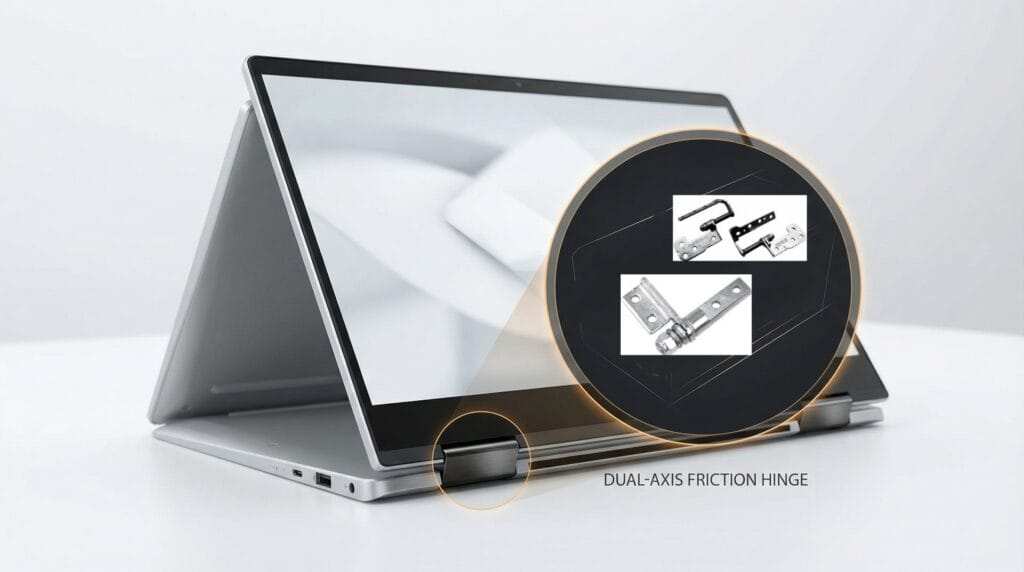
The Core Technology: Micro Friction Hinges
The primary component in a modern laptop or tablet keyboard folio is the micro-friction hinge.
1. High Torque in a Tiny Package
To hold a heavy glass touchscreen stationary against gravity, the hinge must generate significant holding torque (often 3.0 to 5.0 kgf·cm). However, the hinge itself must be small enough to fit inside a laptop chassis that is only millimeters thick.
2. Eliminating “Spring-Back”
Premium friction hinges achieve this high torque using multiple layers of stamped, hardened steel friction bands or specialized spring steel clips wrapped around a precision-machined shaft. These components are lubricated with proprietary high-viscosity synthetic greases. This precise engineering eliminates the “spring-back” effect, ensuring the screen stays exactly where the user leaves it, with zero wobble when typing.
3. Asymmetric Torque (One-Handed Opening)
A major design goal for premium laptops is the “one-handed open.” If the hinge torque is too high, lifting the screen will lift the entire base of the laptop off the desk.
To solve this, engineers use asymmetric friction hinges. These hinges are designed to provide high resistance when pushing the screen backward (to hold it up against gravity) but significantly lower resistance when pulling the screen forward (to close it) or lifting it from the closed position.
The Next Step: Integrating Micro-Rotary Dampers
While friction hinges handle the positioning, they do not provide a “soft-close” effect. If a user pushes the screen closed quickly, the constant resistance of the friction hinge won’t stop it from slamming at the very end of its travel.
To achieve true soft-close in consumer electronics, manufacturers like JAN Hinge Damper are developing ultra-micro rotary dampers.
The Miniaturization Challenge
A standard rotary damper used in a glove box might be 20mm in diameter. For a laptop or a smart home pop-up camera, the damper must be incredibly small—sometimes less than 5mm to 8mm in diameter.
Creating a sealed chamber, injecting highly viscous silicone oil, and molding a microscopic internal rotor that can withstand thousands of cycles without leaking requires extreme precision manufacturing and ultrasonic welding techniques.
The Hybrid Hinge
In the most advanced consumer electronics, engineers are beginning to combine these technologies into hybrid hinges. The friction hinge handles the heavy lifting and positioning for the first 150 degrees of motion. As the screen approaches the final 10 degrees of closure, a tiny cam mechanism engages the ultra-micro rotary damper. The damper’s viscous fluid resistance takes over, absorbing the kinetic energy and allowing the screen to glide silently to a close, protecting the glass and the internal electronics from impact shock.
As an engineer or procurement manager in the consumer electronics industry, you know that the hinge is the silent hero of any laptop or tablet. When a hinge works perfectly, the user never even thinks about it. But when it fails — when a screen droops during a presentation, or a 2-in-1 device collapses in “tent mode” — it becomes the defining flaw of the entire product.
In today’s ultra-competitive market, OEM brands are pushing the limits of thinness, weight, and multi-mode functionality. The demand for robust, high-cycle-life micro-hinges has never been higher. Whether you are designing a rugged tablet for field workers or the next generation of ultrabooks, selecting the right friction hinge is a critical decision that impacts user experience, warranty claims, and your brand’s reputation.
In this comprehensive guide, we will explore the core technologies behind laptop and tablet hinges, the key engineering challenges you must overcome, and the critical criteria you need to evaluate before signing off on a supplier’s datasheet. Let’s talk on Whatsapp
The Core Challenge: Balancing Torque and Thinness
The fundamental physics of a laptop hinge are relatively straightforward: it must generate enough rotational friction (torque) to hold the weight of the display panel against gravity at any given angle. However, the engineering reality is incredibly complex.
Modern ultrabooks demand hinge barrels that are often less than 4.5 millimeters in diameter. Within that microscopic space, the hinge must house a mechanism capable of generating precise, consistent torque — typically between 0.5 and 3.0 N-m — over tens of thousands of open-close cycles without degrading.
If the torque is too low, the screen will slowly drift downward, a phenomenon known as “torque decay.” If the torque is too high, the user will need two hands to pry the laptop open, destroying the premium “one-hand open” experience that consumers expect from high-end devices.
The 4 Primary Types of Laptop and Tablet Hinges

While the external aesthetics of laptops vary wildly, the internal mechanics of their hinges generally fall into four proven categories. Understanding these architectures is the first step in matching a hinge to your product’s specific requirements.
| Hinge Type | Internal Mechanism | Best Application | Key Advantage |
| Shaft / Barrel Hinge | A precision-machined shaft tightly wrapped inside a rolled spring-steel band (curl structure). | Standard clamshell laptops and ultrabooks. | Extremely thin profile; provides smooth, consistent friction with minimal backlash. |
| Disc-Stack Hinge | Alternating stationary and rotating friction discs compressed along a central shaft. | Rugged laptops, heavy mobile workstations, and industrial tablets. | Capable of handling high torque loads (up to 15.0 kg-cm); incredibly durable. |
| 360° Dual-Axis Hinge | Two parallel friction shafts geared together, allowing full rotation. | 2-in-1 convertible laptops (laptop, tent, stand, and tablet modes). | Enables multi-mode functionality while maintaining synchronized, elegant movement. |
| Detent Hinge | Incorporates a mechanical “catch” or cam profile at specific angles. | Tablet kickstands and specialized professional displays. | Provides a satisfying tactile “click” and locks securely at predefined ergonomic angles (e.g., 135°). |
Engineering the 2-in-1 Convertible Experience
The rise of the 2-in-1 convertible laptop has completely rewritten the rulebook for hinge design. Unlike a traditional clamshell laptop that only opens to about 135 degrees, a 2-in-1 device must rotate a full 360 degrees, transforming seamlessly from a laptop into a tablet.
This requires a sophisticated dual-axis synchronized hinge. Inside the hinge casing, two parallel friction shafts are connected by microscopic gears. As the user pushes the screen past 180 degrees, the gears ensure that both shafts rotate at the exact same speed. This synchronization prevents the screen and keyboard from misaligning or binding, ensuring a fluid, premium feel.
Furthermore, the torque profile of a 360-degree hinge must be carefully calibrated. It needs to be firm enough to hold the device securely in an inverted “V” shape (tent mode) on a slippery glass table, yet smooth enough to fold flat into tablet mode without feeling stiff or grinding.

Critical Procurement Criteria: Beyond the Spec Sheet
When evaluating hinge suppliers for your next consumer electronics project, the basic torque specification is only the starting point. To avoid costly redesigns and high warranty return rates, procurement teams and lead engineers must interrogate the supplier on several critical performance metrics.
Cycle Life and Torque Decay is the most important metric. Do not accept a simple “rated for 20,000 cycles” claim. You must ask to see the full torque decay curve. All mechanical friction components wear down over time. A low-quality hinge might start at 2.5 N-m of torque, but degrade by 40% after just 5,000 cycles, causing the screen to flop. Premium hinges, engineered with hardened steel and proprietary lubricants, will maintain their torque within a strict ±15% tolerance even after 30,000 to 50,000 cycles.
Thermal Stability is equally critical. Laptops get hot, and they are frequently left in freezing cars or baking in the sun. The friction characteristics of the hinge must remain consistent across a wide operating temperature range — typically -20°C to +60°C. If the hinge relies heavily on temperature-sensitive plastics or cheap lubricants, the screen might become impossibly stiff in the winter and dangerously loose in the summer.
Material Selection and Weight matters enormously for premium ultrabooks, where every gram counts. While heavy-duty zinc alloy die-casting is excellent for budget laptops, high-end devices increasingly rely on aerospace-grade aluminum or specialized stainless steel alloys to maximize the strength-to-weight ratio. Furthermore, if the hinge is exposed, the material must accept premium surface finishes — such as anodizing or PVD coating — to match the laptop chassis.

At Janhinge, we understand that a laptop is only as good as the hinge that holds it together. We specialize in engineering ultra-compact, high-cycle-life friction hinges for the world’s most demanding consumer electronics brands. Whether you need a standard barrel hinge for a budget Chromebook or a custom dual-axis 360-degree mechanism for a flagship 2-in-1, our engineering team is ready to collaborate. Contact us today to request physical samples and detailed cycle-life test reports.
Frequently Asked Questions (FAQ)
Q1: How do I calculate the correct torque for my laptop screen?
The basic formula is: Torque = (Screen Length / 2) × Screen Weight × 9.8. You must measure the distance from the hinge pivot to the top edge of the screen, and accurately weigh the entire display assembly. Because laptops are handled dynamically — users push them fast or type heavily — we strongly recommend adding a 20% to 30% safety margin to your calculated static torque to ensure the screen does not wobble during use.
Q2: What is “asymmetrical torque” and why do some laptops use it?
Asymmetrical (or one-way) torque means the hinge provides different levels of resistance depending on the direction of movement. Many premium laptops use asymmetrical hinges that offer higher resistance when opening (to hold the screen firmly against gravity) but lower resistance when closing. This allows for the highly desirable “one-hand open” experience while still providing a satisfying, damped closure.
Q3: Why do some laptop hinges make a clicking or grinding noise over time?
This is usually a sign of catastrophic mechanical wear or lubrication failure. In cheap hinges, the friction band can score or gall the central shaft, creating metal shavings that cause grinding. It can also occur if the hinge was not properly sealed against dust and debris. Premium hinges use hardened steel components and specialized dry lubricants to prevent galling entirely.
Q4: Can a 360-degree hinge be used for a heavy industrial tablet?
Yes, but it requires a specialized heavy-duty design. Standard consumer 360-degree hinges are optimized for thinness and light weight. For an industrial or rugged tablet, we recommend a reinforced dual-axis disc-stack hinge. These are slightly thicker but can handle the immense torque loads and abuse expected in field environments.
Q5: What is the typical lead time for a custom OEM laptop hinge?
Because micro-hinges require incredibly tight manufacturing tolerances and extensive cycle testing, developing a custom hinge is a rigorous process. Typically, initial CAD design and prototyping take 3 to 4 weeks. Once the prototype is approved, tooling and first-article inspection (FAI) require an additional 4 to 6 weeks. We advise engaging with your hinge supplier at the very beginning of your chassis design phase, not as an afterthought.
To discuss custom micro-hinge solutions for your consumer electronics manufacturing needs, contact the engineering team at www.janhinge.com.